

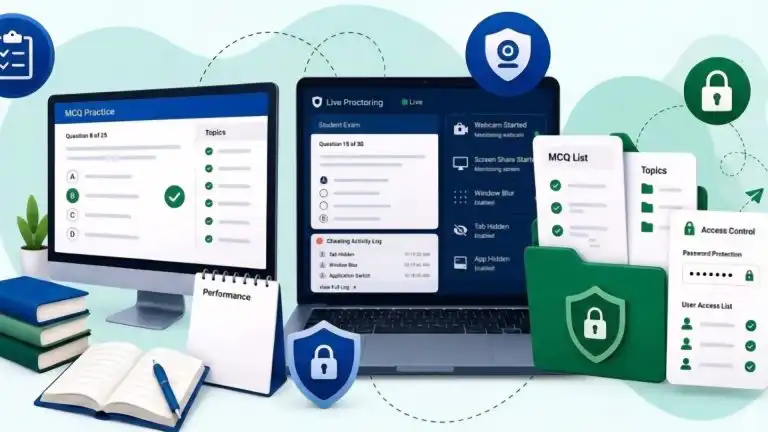
Creating online assessments involves more than uploading a few questions and sharing a link. Educators need secure exams, reliable question banks, content protection, reporting tools, and sometimes collaboration across multiple team members.
MCQS Zone aims to bring all of these functions together in a single platform. Rather than focusing on one area of assessment, it combines exam delivery, question management, AI-assisted content creation, team collaboration, and practice resources.
In this review, we’ll examine five key features that define the platform and explore how they can benefit students, teachers, training providers, and educational institutions.
Feature 1: AI Remote-Proctored Online MCQs Test Exams
One of the biggest concerns in online assessments is maintaining exam integrity. Without proper monitoring, institutions often struggle to verify whether candidates completed the test under fair conditions.
MCQS Zone addresses this challenge through built-in AI proctoring tools that can be enabled directly from the exam settings.
Administrators can:
- Set exam schedules and durations
- Configure grading rules
- Control result visibility
- Add candidates individually or through Excel imports
- Monitor exam activity through webcam and screen-sharing options powered by AI
The platform also maintains activity logs that track events such as tab switching and focus loss. After the exam, administrators can review performance reports, monitoring evidence, and candidate activity timelines.
Why It Matters
This feature is particularly useful for:
- School and colleges
- Coaching centers
- Institution certification programs
- Corporate training assessments
- Remote learning environments
Learn how to create an online AI-proctored MCQ test.
Feature 2: Private MCQ Sharing and Content Protection
For many organizations, question banks represent years of work. Whether the content is designed for entrance exams, employee training, or premium courses, controlling access is often just as important as creating the questions themselves.
MCQS Zone provides two layers of protection:
- Password-restricted access: Allows the user to enter a password to access private MCQ content.
- User-based access control: Authorized users are automatically granted access to secure Topic MCQs.
This allows organizations to keep materials available online while limiting access to approved users.
Why It Matters
Useful for:
- Paid courses
- Internal assessments
- Faculty-only resources
- Corporate training content
- See how private MCQ sharing works
Feature 3: AI-Assisted Question Generation
Question writing is often one of the most time-consuming parts of assessment development.
Instead of starting from a blank page, users can use AI to generate MCQs based on:
- Topic
- Difficulty level
- Number of questions
- Explanation requirements
The AI-generated MCQ questions can then be reviewed, edited, or discarded before publication.
Important Note
The best use of an AI MCQ maker is as a drafting assistant rather than a replacement for subject expertise. Human review remains essential to ensure accuracy, clarity, and educational quality.
This makes the review feel more balanced and credible.
Feature 4: Organization and Team Management
Assessment development is rarely a solo activity.
Schools, academies, and training departments often involve multiple contributors, including
- Subject matter experts
- Reviewers
- Administrators
- Department heads
To support this workflow, MCQS Zone allows organizations to invite team members and assign role-based permissions.
Access can be controlled at both:
- Organization level
- Topic level
This helps prevent accidental edits while ensuring each team member can access the tools they need.
Feature 5: Public MCQ Practice Hub
While the platform focuses heavily on assessment management, it also includes a public collection of practice MCQs.
Students can explore topics across the following:
- Academic subjects
- Professional certifications
- Technology
- Competitive exams
Because new content is continuously added by contributors, the library grows over time and provides learners with additional opportunities for self-assessment.
Example Areas
- Entry Test MCQs, i.e., solved PMDC MDCAT (UHS) 2025 MCQs
- Board Past Paper MCQs
- Artificial Intelligence MCQs
- Renewable Energy MCQs
How the Features Work Together
Many assessment platforms solve one problem well but require additional tools for everything else.
For example, an educator may use the following:
- One platform for question creation
- Another for exam delivery
- A third for team collaboration
- Separate spreadsheets for reporting
MCQS Zone takes a different approach by connecting these functions into a single workflow.
A typical process might look like this:
- Generate MCQs or import questions
- Organize them into a topic
- Restrict access to authorized users
- Convert the topic into a monitored MCQ exam test
- Review reports and performance data afterward
The result is a more streamlined assessment process with fewer tools and less administrative overhead.
Conclusion
MCQS Zone combines several capabilities that are often spread across multiple assessment platforms. Its strengths lie in bringing question creation, exam security, content protection, collaboration, and practice resources into a single ecosystem.
While the value of any platform ultimately depends on an organization’s specific requirements, the combination of these five features makes MCQS Zone a practical option for educators, training providers, and students looking for a more centralized approach to MCQ-based learning and assessment.
If you want to submit your articles and/or research papers, please visit the Submissions page.
To stay updated with the latest jobs, CSS news, internships, scholarships, and current affairs articles, join our Community Forum!
The views and opinions expressed in this article/paper are the author’s own and do not necessarily reflect the editorial position of Paradigm Shift.

Paradigm Shift is an official staff account.